
Overview of word clouds
Word clouds are visual summaries that turn text from your survey’s open-ended responses into a readable image. They highlight the most frequent words by displaying them in larger, bolder fonts.
They can help you spot important themes and patterns easily and make qualitative data more engaging for presentations and reports.
Creating a simple word cloud
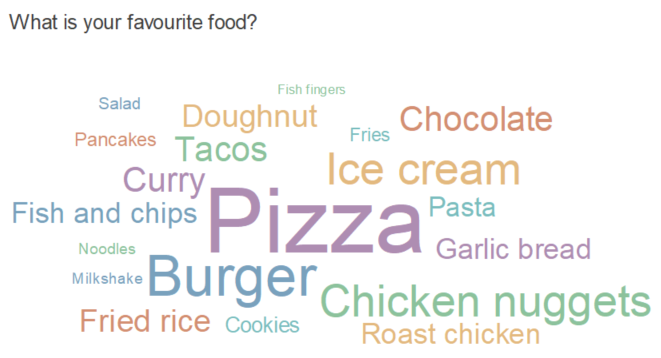
A word cloud based on a single open-ended text response shows the overall themes. Examples may range from responses on how the participant feels about an organisation to their favourite food.
- Click
 on the Snap XMP Desktop toolbar to create a word cloud.
 - Enter the open-ended question name or variable in the Analysis field.
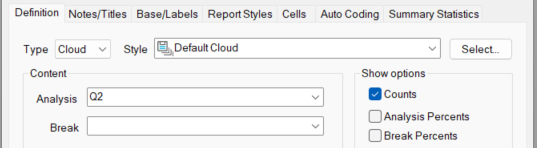
- Decide if you would like to show the entire text, such as, favourite food or one-word responses, or individual words in longer text responses. Select the Auto Coding tab. In the Literal drop-down, select Words for individual wordsor Values for the question response text.

- Select the maximum number of values you would like in the cloud by changing the value in Limit codes.
- Press Apply to display the cloud.
Combining variables into a word cloud
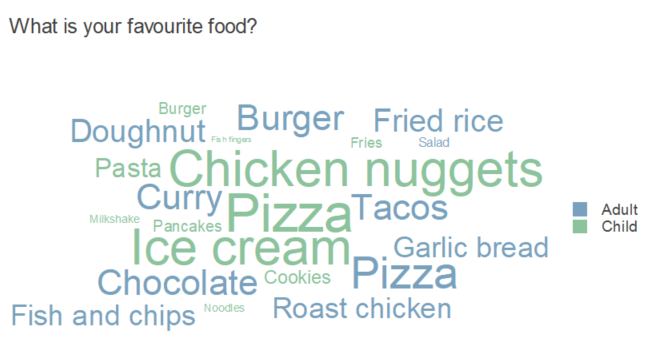
It is possible to combine variables into a single word cloud. You may wish to see responses based on another variable, such as, age or gender.
- Click on the Snap XMP Desktop toolbar to create a word cloud.
- Enter the open-ended question name or variable in the Analysis field.
- Enter the other question name or variable in the Break field.
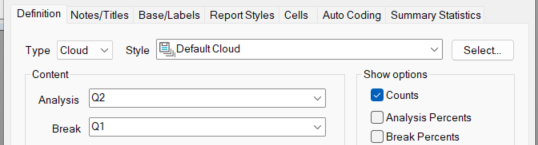
- Decide if you would like to show the entire text, such as, favourite food or one-word responses, or individual words in longer text responses. Select the Auto Coding tab. In the Literal drop-down, select Words for individual wordsor Values for the question response text.

- Select the maximum number of values you would like in the cloud by changing the value in Limit codes.
- Press Apply to display the cloud.
Customising a word cloud
You can change the appearance of word clouds to display responses at different sizes, colours and opacity according to their frequency.