
Printing literal responses
-
Click
 to display the Data Entry window for the current survey.
-
Click
 to display the Print Data dialog box.
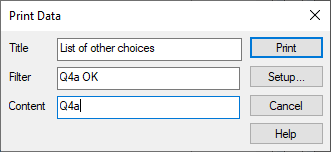
- Specify a Title for the report if required.
- In the Filter field type the specification to select the cases to be printed:
- For example, to print only those cases where a response has been given to Q4a specify Q4a OK.
- Specify the Content as the name of the variable or variables to be printed:
- Individual questions (e.g. Q4a)
- List of questions (e.g. Q1,Q4)
- Range of questions (e.g. Q1 TO Q4)
- Click Print to print the report.